New · Sand.ai MAGI-2 480B model

Magi2 AI Video Generator — Text & Image to 1080p Video

Magi2Gen is an online Magi2 AI video generator for MAGI-2, the AI video generation model Sand.ai released on November 24, 2026: type a scene or upload a start image, pick 5 to 30 seconds and an aspect ratio, and get native 1080p, 25 fps video with synchronized dialogue, sound effects and music. Cloud generation with Google sign-in is opening shortly; the examples, prompt builder and cost tools work now.

Length
Aspect ratio

Cloud generation is opening shortly. Meanwhile, watch the official samples below or polish your prompt.

Preview 00:00:05:00
Sample made with MAGI-2 · source: Sand.ai · your video appears here

Examples

Real Magi2 Video Examples

These clips were generated by MAGI-2 and published by Sand.ai in its November 24, 2026 launch post; they play from Sand.ai's servers. Press play to watch with sound. Where it fits, "Try a similar prompt" loads a comparable prompt into the generator above.

Omni-reference · 29.8 s1080p · 25 fps · sound

One 30-second take through five painting styles

Conditioned on five classic paintings, including The Starry Night, Water Lilies and A Sunday Afternoon on the Island of La Grande Jatte, MAGI-2 holds one continuous camera move while the brushwork changes from style to style, with no cuts.

Prompt pattern: give each reference image one style, then describe the camera path from the first scene to the last.
Official sample · Sand.ai
Omni-reference · 16.9 s1080p · 30 fps · sound

One character across three flower worlds

Reference images lock the character's face and wardrobe plus three settings: an iris hillside, a pink rose garden and a lily valley. The clip alternates close-ups, low-angle views and wide shots, passing between gardens behind leaves and petals.

Prompt pattern: one reference image per job — the character, then each location — and say what to ignore in each.

Official sample · Sand.ai
Timeline control · 29.8 s1080p · 25 fps · sound

15 timed shots in one 30-second scene

A snowboarder rides through snowy New York streets: threading the gap between a bus and a taxi, launching off a ramp over market stalls, then arcing over parked cars. The timeline on screen marks each planned shot. In Sand.ai's timeline benchmark, all 16 specified cut points landed on target.

Prompt pattern: number each shot with a time range and one action, e.g. [06s–08s] extreme wide, launches off a ramp over market stalls.

Official sample · Sand.ai
Video edit · 10 s1080p · 25 fps · sound

Editing an existing video with a text instruction

Starting from a recording of the MAGI-2 Preview homepage, a text instruction turns the cursor into an eraser that removes "Preview" and spirals the background planet into a black hole. Video editing isn't offered in the Magi2Gen generator yet; this shows what the model itself can do.

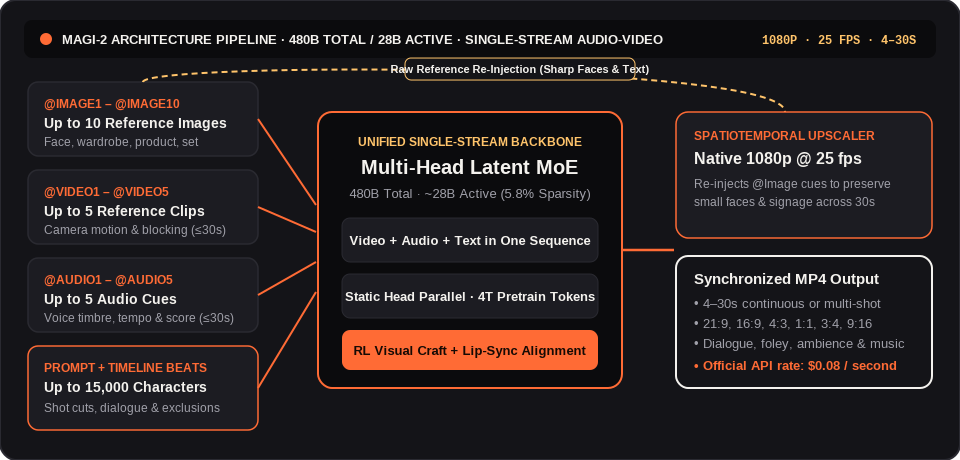
Magi2 480B Multi-Head Latent MoE pipeline showing up to 20 @Image, @Video, and @Audio omni-references feeding a single-stream audio-video backbone and 1080p reference re-injection upscaler
Architecture overview: Magi2 packs video, audio, and text tokens into one single-stream Multi-Head Latent MoE sequence (480B total, ~28B active) and re-injects raw @Image references during 1080p spatiotemporal upscaling.

The model

What Is Magi2?

Magi2 (officially MAGI-2) is the AI video generation model Sand.ai released on November 24, 2026: a 480-billion-parameter mixture-of-experts model, with about 28 billion parameters active per token, that renders 4 to 30 seconds of native 1080p, 25 fps video and its soundtrack in one pass, guided by up to 20 image, video and audio references. It ranks #1 on the Artificial Analysis image-to-video leaderboard, is available on Higgsfield, and Sand.ai's API lists it at $0.08 per second.

How it works

How to Make a Video with the Magi2 AI Video Generator

Magi2, the MAGI-2 video model by Sand.ai, accepts long, detailed prompts, so describing what happens over time matters more than piling up adjectives. For multi-reference prompts, try the Magi2 prompt generator.

  1. Choose Text to Video or Image to Video

    Write a scene from scratch, or upload a JPG, PNG or WebP start image that Magi2 animates. Uploaded images are safety-checked, used only for that generation and deleted within 24 hours.

  2. Describe the action, camera and sound

    Say who is in the shot, what they do in order, where it happens, how the camera moves and what we hear. For dialogue, put the spoken line in quotes and name the language.

  3. Pick length and aspect ratio

    Choose 5, 10, 15 or 30 seconds, and 16:9 for YouTube, 9:16 for Reels and TikTok, 1:1 for feeds, or 21:9, 4:3 and 3:4.

  4. Generate, download and reuse

    The button shows the cost before you start. Finished MP4s play on the page, download in one click and are saved to your account. If a job fails, the credits go back automatically.

FAQ

Magi2 Video Generator Frequently Asked Questions

What is the Magi2 AI video generator?

Magi2 (MAGI-2) is the AI video generation model by Sand.ai, released on November 24, 2026, with 480 billion parameters. It creates 4 to 30-second videos at native 1080p and 25 fps with synchronized sound from a text prompt or a start image. Magi2Gen is an independent site that lets you use it in the browser with credits.

Is Magi2Gen free to try?

Watching the official samples, writing prompts with the prompt builder and estimating costs are free and need no account. Cloud video generation uses credits and is opening shortly with Google sign-in.

What happens to my credits if a generation fails?

Credits are charged when a job starts and returned to your balance automatically if Magi2 can't finish the video, so a failed generation never costs you anything.

Can I upload my own photo to animate?

Yes, in Image to Video mode. Your photo is checked for unsafe content first, sent to the video model only to create your clip, and deleted from our storage within 24 hours.

Can I use the videos commercially?

Videos you generate are yours to use, including commercially, as long as your prompts and uploaded images don't infringe anyone else's rights and you follow our Terms of Service.

What are Magi2's current limitations?

According to Sand.ai, very fast motion can occasionally show continuity artifacts, medium and wide 2D animation can look overly smooth, and dense soundscapes still have room to improve. Shorter clips with one or two actions give the most reliable results.

Found this useful?

Creator Notes & Prompt Feedback (0)

Share a Magi2 prompt pattern, timing tip, or reference setup that worked well for your scene. Plain text only.